
June 24, 2026 Release
Enhancements:
- Zone Runtime History Report – Introduced the new Zone Runtime History report — a single consolidated view that turns raw controller activity into clear, actionable insight into how each zone actually watered.
- Zone Runtime Totals – review total watering time per zone at a glance, with scheduled and manual runtime separated for quick performance assessment.
- Daily Runtime Breakdown – a day-by-day visual timeline of every watering cycle, with runs that cross midnight accurately split and attributed to the correct day.
- Manual Irrigation Tracking – distinguishes manual runs from scheduled watering and identifies the user who initiated each run, improving operational accountability.
- Moisture Sensor Insights – overlays moisture and temperature trends against configured sensor limits, helping correlate watering activity with soil conditions.
- Flexible Output & Delivery – available in both PDF and Excel with scheduled delivery and intelligent data resolution based on the selected date range.
- Audit Log Reporting Enhancements – Redesigned Audit Log reports to organize changes by user login session, making it easier to review activity and configuration updates. Audit entries are grouped and categorized as Added, Updated, or Removed, with simplified change details available in both PDF and Excel exports.
- Flow Meter Totals Excel Report Enhancements – Enhanced Flow Meter Totals Excel reporting with additional operational metrics including Zones Running, Expected Flow, Actual Flow, and Flow Variance. These improvements provide greater visibility into irrigation performance and help identify flow-related anomalies more effectively.
- Generate Reports Performance & Resolution Improvements – Improved report generation performance and scalability through optimized processing of large datasets. Enhanced resolution handling automatically selects the most appropriate data granularity based on report type and date range while simplifying report configuration and improving consistency across reporting modules.
- Scheduled Report Email & SMS Redesign – Modernized report notification emails and SMS messages with an improved user experience and enhanced security. Large PDF reports are now delivered through secure authenticated download links, providing more reliable report access and delivery.
- Alarm Monitoring Performance Optimization – Enhanced alarm monitoring by optimizing background polling and notification updates. Alarm counts are refreshed more efficiently, ensuring users receive timely alarm information while reducing system load and improving overall application performance.
- Enhanced Device Search Experience – Expanded search capabilities across devices including Zones, Pumps, Flow Meters, Sensors, and Event Switches. Users can now search using either device descriptions or biCoder serial numbers, with improved device visibility through a redesigned Connected Device display.
- Google Tag Manager (GTM) Integration – Implemented Google Tag Manager across AppManager and BaseManager to support improved analytics and event tracking. This enhancement provides better visibility into user navigation, page activity, and overall application usage.
- Baseline Log Management Improvements – Enhanced system stability by improving log management and storage utilization. Optimized log rotation and compression help prevent disk space exhaustion and improve overall platform reliability.
- BACnet Integration Improvements v3.0
- Added support for new BACnet device types, including Pump, Pressure Sensor, Precipitation Sensor, Water Source, POC (Control Point), and Mainline.
- Expanded MSI status reporting with 15 new states, increasing coverage from 14 to 29 status values.
- Enhanced operational monitoring, fault detection, and diagnostic capabilities through additional device telemetry and status points.
- Maintains the existing BACnet instance numbering convention (instance = deviceNum × 100 + pointCode) for seamless integration compatibility and backward compatibility with existing implementations.
- MQTT Publisher & Home Assistant Integration
- Added a native MQTT Publisher to BACnet Manager for direct publishing of BACnet controller data to MQTT brokers.
- Added Home Assistant MQTT Auto-Discovery support for automatic detection and configuration of controllers, sensors, zones, equipment, and alarms.
- Improved device identity management using controller MAC addresses to provide stable device identification and preserve historical data across restarts.
- Enhanced monitoring and visualization capabilities through automated publishing of controller, zone, sensor, equipment, and alarm data.
- Added optional Home Assistant command integration to support controller operations directly from Home Assistant.
Bugs / Issues Resolved:
- Water Usage Report Data Display Fix – Resolved an issue where actual water usage values were not displayed correctly in Water Usage reports. Reports now accurately present both expected and actual water usage information.
- Custom Map Marker Update Fix – Fixed an issue preventing users from updating custom marker locations on maps. Marker position changes are now saved correctly and persist across page refreshes.
- Manage User Field Validation Improvement – Updated Real Name and Username fields to enforce a 45-character limit with inline validation. This provides a clearer user experience and prevents invalid entries during user creation and editing.
- Generate Reports Device Selection Fix – Resolved issues with controller and device lists not updating correctly when sites or controllers were removed from report selections. Dependent selections now refresh accurately based on current choices.
- Version Release Log Page UI Fix – Corrected a layout issue that caused extra space to appear below the footer at certain browser zoom levels. The page now maintains consistent footer alignment and visual presentation across supported resolutions.
February 18, 2026 Release
Enhancements
- SSO Login Experience: Introduced a simplified SSO login for users with a @stageandstall.com email domain, requiring only an email and Continue action without a password. The system automatically detects SSO and non-SSO users to ensure the appropriate login flow, with clear validation for unauthorized access.
- Company-Level Event Pause: Added an Event Pause option under Manage Company, enabling users to pause and resume watering activities across all or selected sites and controllers. Up to 8 Event Pauses can be configured per company, with company-level settings overriding lower-level configurations.
- Company-Level Water Window: Enabled centralized Water Window configuration at the Company level, automatically applying settings to associated sites, controllers, and programs. Company-level Water Windows take precedence over existing lower-level configurations.
- Report Subscriptions & Scheduled Delivery: Users can subscribe to reports such as Controller Information, Subscription Information, Faceplate Replacement History, Water Usage, and Flow Meter Totals directly from report pages. Subscriptions support configurable frequency (Daily, Weekly, Monthly), dispatch time, recipient selection, and PDF/Excel attachments, with mandatory validations enforced. Reports are automatically delivered at the scheduled time, and subscriptions can be edited or disabled without impacting other configurations.
- Enhanced Controller Access Management: Controller access can now be assigned during user creation by selecting a company, allowing multiple controllers to be granted at once. Existing user access can be modified from the user edit page, with company-based dynamic controller loading for accurate role-based access control.
- Generate Reports Access for Company Admin Users: Enabled the Generate Reports module for Company Admin users, providing access to all available reports within the module. Company Admins can now configure report subscriptions and receive scheduled notifications via Email and SMS, enhancing visibility and reporting capabilities.
Squashed bugs
- Fixed issues in the Manage Firmware search feature. Search now supports company name, site name, and controller name (including partial keyword search), and clearing the search properly restores the full firmware list.
- Resolved the issue allowing duplicate usernames with different letter cases. Usernames are now treated as case-insensitive, and the system prevents both exact and case-variant duplicates with an appropriate error message.
- Fixed the issue where Total Gallons was incorrectly displayed in the Water Usage report CSV export. The exported CSV file now correctly reflects the Total Gallons value as displayed in the UI.
- Corrected the Y-axis label spelling from “Thounsands of Gallons” to “Thousands of Gallons” in Flow Meter Totals and Water Usage reports, ensuring consistent display across filters and refresh actions.
- Resolved inconsistency in the Send Frequency info message between New and Edit Scheduler views in the Controller Audit Log report and aligned info messages across report schedulers.
- Fixed the Scheduler Description field behavior by enforcing a 45-character limit and preventing additional input beyond the allowed length, eliminating incorrect or unclear error messages.
December 18, 2025 Release
Enhancements
- Auditing: A new auditing feature has been added to track and record all controller configuration changes. This ensures full transparency, easier troubleshooting, and a reliable history of modifications.
- Subscriptions & Notifications: The system now delivers real-time configuration change alerts and scheduled report notifications in a secure and user-friendly way. Notifications are intelligently grouped, supported by a clean audit history, and powered by a robust background scheduler to ensure timely delivery via SMS and email, with optional file attachments.
- Company Level Seasonal Adjustment: Added “Manage Company” option in AppManager Schedule. Users can now add and modify seasonal adjustments for all sites, controllers and programs within a company.
- Inactive/Lite Subscription Validation: Validated inactive and lite subscription type controllers in AppManager Schedule manager across manage controller, site and company levels to prevent display of these controllers.
- Master Valve Leakage Current: For controllers version 19.7.1 and above, included leakage current value in test results for master valve devices across all places in baseline.
- UAE Country Support: Added UAE support across Manage Company, Site, Flowstation, Basestation 3200, Basestation 1000, and Substation modules in the Baseline system.
Squashed bugs
- Fixed Master Valve Alignment issue on the AppManager Schedule page for 1000 Controllers.
- Fixed Company Name Apostrophe handling issue in BaseManager.
- Fixed Invalid Packet Error that occurred during large program changes.
- Fixed issue where Program Manual Run did not work when the controller was in Rain Delay.
- Validated Send Command user access functionality: Commands are now sent only when the user has appropriate controller access. Otherwise, the action is not triggered.
October 16, 2025 Release
New Features and Enhancements
- Manage Subscription Columns Update
- Added Lightning Protection and Connected Device Coverage columns with alignment and export support in Manage Subscription page.
- 3200S Controller Device Type Update
- Updated device type for 3200S controller across all pages in BaseManager and AppManager.
- Graphic Image and URL Link Fix
- Added new graphic image and URL redirection.
- Substation Connectivity Status Enhancement
- Enhanced device status color updates for substation connectivity in 3200S controller; statuses now update correctly between Online and Offline.
- Program Summary PDF Export
- Fixed Program Summary PDF export for 3200S, 3200, and 1000 controllers.
Squashed bugs
- Special Character Display
- Fixed special character display issue in company, site, and controller names across all modules.
- 1000 Controller Program Start Time
- Resolved issue where 1000 controller program start time at 12 AM was not saved correctly.
- Alert Settings Behaviour
- Fixed Allow All Alerts and Disable All Alerts functionality to ensure correct SMS and email notification behaviour.
- 1000 Controller Program Deletion
- Resolved issue with 1000 controller program deletion to ensure complete data removal and correct packet updates.
August 20, 2025 Release
New Features and Enhancements
- Program Level Event Pause
- In ScheduleManager, a user can now see an option to create an Event Pause for individual programs. The value the user sets in the new feature is what each Program will update to when the Seasonal Adjust update is saved.
- Site Level Water Window and Event Pause
- In ScheduleManager, a user now has access to three different Site management options. The ability to set a Seasonal Adjust value for all controllers at a Site was introduced in April 2025. There are now two additional options: Event Pause and Water Window. A user can create an Event Pause and have it apply to every controller at the Site, or even select specific controllers based on their need. A Water Window can now be created at a Site level which will apply to all Programs across all controllers, or specific controllers based on need. This is a great addition for customers who are managing Sites with water day restrictions or drought-related restrictions.
- Date Range Interface for Controller Files
- In AdminManager, when a user goes to the Manage Controller interface, they can now download the controller Alarm files with specific date ranges. Previously, when managing a 3200S, the files could only be generated for one day at a time which was extremely time-consuming when multiple days were required.
- Audit Log for Managing Controllers
- In AdminManager, when a user goes to the Manage Controller interface, they can now download an Audit log that tracks various changes to controller such as programing changes, what the source of the change was, what user was associated with the change, and the time stamp for when the change occurred.
User-experience Updates
- Date Range Interface for Controller Files
- In AdminManager, when a user goes to the Manage Controller interface, they can now download the controller Alarm files with specific date ranges. Previously, when managing a 3200S, the files could only be generated for one day at a time which was extremely time-consuming when multiple days were required.
- Audit Log for Managing Controllers
- In AdminManager, when a user goes to the Manage Controller interface, they can now download an Audit log that tracks various changes to controller such as programing changes, what the source of the change was, what user was associated with the change, and the time stamp for when the change occurred.
- Extended Warranty Enhancements
- In the Manage Subscriptions and Warranties interface, a new field has been added to track an Extended Warranty Start Date and Extended Warranty End Date.
Squashed bugs
- An issue with the v18 to v19 programming converter tool has been resolved to allow it to recognize values with decimal places.
- Site Descriptions, when created in AppManager, will now appear in BaseManager name as expected
- An issue with Weather-based Watering being unexpectedly enabled in ScheduleManager has been resolved.
- For 3200S controllers, an issue with ScheduleManager now allowing users to select the “Use Temperature” value for a moisture sensor S/S/P condition has been resolved.
April 16, 2025 Release
New Features and Enhancements
- Controller Level Seasonal Adjust
- In ScheduleManager, a user can now see an option to adjust the Seasonal Adjust value for any Program in the controller. The value the user sets in the new feature is what each Program will update to when the Seasonal Adjust update is saved.

- Site Level Seasonal Adjust – this is huge!
- For the first time a user can now edit a value and have that value apply to ALL controllers at a Site. A user will now see “Manage Site” as an option in the ScheduleManager app. When a user selects “Manage Site” they will be able see an option to adjust the Seasonal Adjust value for any controller at a Site. The value the user sets in the new feature is what every Program for a selected controller will update to when the Seasonal Adjust update is saved.


User-experience Updates
- In the “Manage Firmware” section of AdminManager, we will no longer show v18 firmware versions for BaseStation 3200S controllers. Additionally, v19 will not show as available for legacy BaseStation 3200 controllers.
- The copyright year now shows 2025.
Squashed Bugs
- An issue with Map Overlays not populating correctly has been resolved.
- An issue with Moisture Sensor data not populating in Analytics has been resolved.
- An issue with the Zone Activity report not working for BaseStation 1000 controllers has been resolved.
February 12, 2025 Release
New Features and Enhancements
- International Units of Measure
- In AdminManager, when managing a Site, a user can now see a new section called “Units of Measure.” This section will allow a user to edit the units of measure for Gallons/Liters, Fahrenheit/Celsius, PSI/BAR, and Inches/Centimeters.
- Controller level Rain Pause for ScheduleManager
- A user can now create a Rain Pause for a controller in ScheduleManager. Additionally, a user with Site Admin or Company Admin privileges can export a change history report for Rain Pause data. The report will show when a Rain Pause was create and what user created the Rain Pause.

User-experience Updates
- For internal users (Super Users), LiveView was not loading reliably even when a controller was online. The remote display code was updated to ensure LiveView loads properly.

Squashed Bugs
- An issue with “Start Days” being removed unexpectedly for BaseStation 1000 controllers in ScheduleManager has been resolved.
December 10, 2024 Release
New Features and Enhancements
- Warranty data in BaseManager!
- In the Manage Subscriptions UI for BaseManager, a user can now see the warranty end date for their Baseline controllers.
- ET data graphing!
- If a user has assigned a weather station to a controller, they can now graph the daily ETo values. Three BaseManager reports have been updated to show ET data: Zone Run Time, Moisture, and Precip sensor.
- BaseStation 1000 users can edit Programs using their mobile device!
- ScheduleManager has been updated to allow BaseStation 1000 programs to be editable.
User-experience Updates
- We are now logging the Log In history for all users which will allow us to better understand who has logged in and when.
Squashed Bugs
- An issue with zone soak/cycle times clearing after a Learn Flow event has been resolved.
- An issue on the Schedules tab where it would display “NaN” in various fields has been resolved.
- An issue in ScheduleManager for BaseStation 1000 controllers not displaying “pause time” and “finish run” has been resolved.
October 16, 2024 Release
New Features and Enhancements
- In the “Advanced” dial position there is a new menu option for “Units of Measure.” A user can change the unit of measure for the BaseStation 3200S display to show:
- Liters or Gallons
- Millibars or PSI
- Centimeters or Inches
- Celsius or Fahrenheit
User-experience Updates
- The number of supported Program Priorities has been increased from 10 to 99. This matches how the BaseStation 3200 with v18 firmware behaves.
Squashed Bugs
- An issue with setting values from LiveView has been resolved
- An issue with assigning SubStations to a 3200S via AdminManager has been resolved
- The 3200S had an issue with the available TCP socket counts being limited to 3 which has been resolved.
October 2, 2024 Release
New Features and Enhancements
- Server migration to new operating system and version 5.0 (Sept. 3, 2024)
- To ensure on-going stability and optimal performance, the Baseline operating system has migrated to the latest available technology.
User-experience Updates
- An issue with user access authorization across Companies has been resolved. (ES-1366)
Squashed Bugs
- Prior to the release, the Admin interface would allow users to add a space in their username which is not supported. This is now resolved.
- There was an issue with AdminManager properly assigning SubStations and FlowStations to the 3200S that has been fixed.
- Canadian addresses were not populating in AdminManager as expected. This has been resolved.
- An issue with the 3200S map marker disappearing from Maps has been fixed.
June 12, 2024 Release
New Features and Enhancements
- Server migration to new operating system
- To ensure on-going stability and optimal performance, the Baseline operating system has migrated to the latest available technology.
- More enhancements for the Schedules App
- The Schedules App will now allow BaseStation 3200 (and 3200S) users to Edit their programs. At this point in development, users can view, create, edit, and delete programs from the Schedules App.
- New Controller sync option
- In BaseManager, the footer for each page has a new button that will allow a user to force synchronize their controller to BaseManager. Prior to this release, only an internal HPDS employee could force a controller sync. This is important for when a controller has connectivity issues or if the server experiences downtime (planned or unplanned) and the user wants all statuses and messages to update.
User-experience Updates
- All dates in AppManager and BaseManager now correctly show 2024.
Squashed Bugs
- An issue with the Water Usage report showing only one day of data has been resolved.
April 10, 2024 Release
New Features and Enhancements
- More enhancements for the Schedules App
- The Schedules App will now allow users who have BaseStation 1000 controllers to create and delete programs. BaseStation 3200 users got this functionality in the February 2024 release.
User-experience Updates
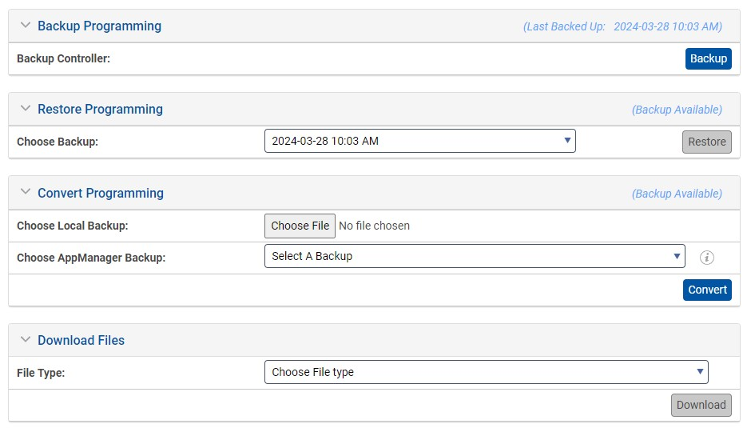
- A new tool in AdminManager will allow users to convert the BaseStation 3200 program backup file so that it’s compatible with BaseStation 3200S controllers with v19 firmware. Click here to learn more!
February 14, 2024 Release
New Features and Enhancements
- Phase 2 of the new Schedules App
- AppManager has a new App! The Schedules App will ultimately replace the “Programs” and “Schedules” interface. The first update allowed users to see programs in ScheduleManager; this most recent update allows users to create and delete programs from ScheduleManager. Click here to learn more!

BaseStation 3200 v18.3 Release
New feature:
- If a BaseStation 3200 has a Precip Sensor connected to it, the user can now set the ET Rainfall Source to the Precip Sensor of their choice. Previously, only Rainfall data provided by Weather Underground was used for ET calculations. Moving forward, customers can use the local Precip Sensor to provide Rainfall values for the ET calculation.

Bug Fixes:
- An issue with how the 3200 calculated ET when used at the same time as Seasonal Adjust has been resolved.
- The 3200 and BaseManager will now show the same runtime data when Weather-based Watering is used. There was a discrepancy between the two systems previously.
- An issue with a Zone’s “Flow Variance Status” has been resolved. The issue would incorrectly prevent Zones from irrigating based on a bad status from the controller.
- Power-cycling the 3200 will no longer clear a Rain Delay state. If the Rain Delay is set to active and the controller is power cycled, the Rain Delay will remain active after the controller has rebooted.
- This resolves ES-1065
- When a ControlPoint, master valve, or pump is disabled, the controller will no longer allow Zones to run by still activating the ControlPoint. Previously, the 3200 would still turn on the ControlPoint if a Zone called for water.
- Pressure and Temperature sensor data will now update in real-time in BaseManager. Previously, the data would update only when the Pressure sensor or Temperature sensor was “Tested” and prompted to send its data.
- This resolves ES-964
- Flow data has been scrubbed to ensure the controller does not send bad values that cause BaseManager and AppManager graphs to show usage in the “millions of gallons.”
- An issue with negative flow values populating after a learn flow event has been resolved.
- Precip Sensor device data will now populate in the controller Program Summary log.
- When a customer restores the programming for a controller based on backup file, the backup file was not correctly writing a “rain stop condition” properly. This issue has been resolved.
- When setting new rain delay days from BaseManager, Quick View does not update the rain delay message which causes a discrepancy between BaseManager and the 3200. This has been resolved.
- An issue with the 3200 generating negative rainfall values has been resolved.
- The 3200 Low Flow Variance shutdown logic has been updated. It was preventing scheduled irrigation despite the shutdown being disabled.
- This resolves ES-1190
- When creating a new program from BaseManager that includes primary and linked zones, setting the tracking ratio for a linked zone to a value other than 100 does not take at the controller. This has been resolved.
- There was a missing packet between the 3200 and BaseManager that created issues in BaseManager when a user created a program at the 3200 display. The 3200 was not properly sending the Program number (e.g. Program 1, Program 2, etc.) which meant BaseManager was not updating properly. This issue has been resolved.
- When a pressure shutdown condition is programmed, the event shuts down watering but does not post a pressure shutdown message when the control point is assigned to the FlowStation. This has been resolved.
- A Water Source managed by the FlowStation will shutdown if it goes over budget even though shutdown is not enabled. This has been resolved.
User experience enhancement:
- The signal quality and signal strength data for a Cloudgate cell modem and a Cloud Network Module cell modem now follow the same logic. Previously, the signal quality values were inverted so great quality for one cell modem type was poor for the other cell modem type. This was causing confusion with internal teams and customers.
December 13, 2023 Release
New Features and Enhancements
- Phase 1 of the new Schedules App
- AppManager has a new App! The Schedules App will ultimately replace the “Programs” and “Schedules” interface in BaseManager when it’s complete. The first phase of the development process includes a new app for users to select, which takes them to a new page in AppManager. The page will display all the controllers in the User’s company. Each controller will provide a drop down menu that will display all programs associated with the controller. This is the first time a Baseline user will be able to see ALL their programs in one view! It’s a huge time saver and helps simplify the program management workflow. Users will only be able to view the programs created in BaseManager for this release. Future releases will enable program creation and editing functionalities.

User-experience Improvements
- The Estimated Program Runtime field in BaseManager has been updated. The update includes a refinement of the calculation algorithm that generates a better approximation of the overall program runtime. This gives the user a better understanding of their program configuration and what the controller is going to do and when.
Squashed Bugs
- Resolved multiple issues with the new 3200S controller sending and receiving program data in BaseManager.
- An issue with displaying the correct user assignments for a controller has been resolved in AppManager.
October 10, 2023 Release
New Features and Enhancements
- AdminManager: Manage Company, Site, and User
- The AdminManager tool in AppManager will now allow HydroPoint employees and Baseline customers to manage Companies, Sites, and Users. The management capabilities include creating new companies, sites, and users in addition to editing and disabling existing companies, sites, and users.
- The new tool will also allow us to export all Company, Site, or User data to CSV or PDF to easily share and access key information.
- One of the coolest new features includes the “Audit Log.” You can access this feature by selecting a Company, Site, or User to open the slide out menu. Located near the bottom of the slide out menu for that element is a field called “Download Audit Log.” This field will generate a CSV file that will include a log of all the changes that have been made to that element and who made the changes.
- FlowStation Configuration Test: Flow Setup Results
- This is a new test that will give the user a single view to see all programs associated with a mainline regardless of what controller is managing the program. This is the first such view anywhere in BaseManager or AppManager and will be a huge time saver for users who are trying to optimize their FlowStation programming model. This is where we’ll display information for what programs are expected to run and when and how much max GPM will be required. This establishes if there are probable conflicts that will result in a program overrun.
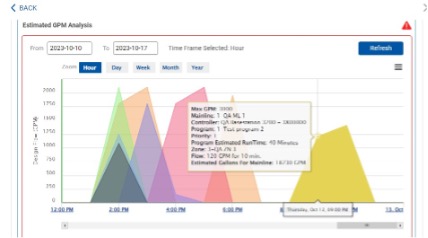
- Here is the updated FlowStation Configuration Test overview that now includes this new functionality
User-experience Improvements
- The BaseManager UI will no longer allow a user to set multiple conditions of the same type for a single device within a program. The 3200 does not support that logic and BaseManager was previously showing a user that they could do it even though nothing would actually happen.
- In the Manage Firmware UI, we can now sort the various columns to more easily access data.
Squashed Bugs
- Resolved issue with SubStation device addresses saving over each other in a 3200
- Resolved issue for stand-alone servers with default controller values
- Resolved issue for a broken link for Weather Underground from the Maps view in BaseManager
- Resolved issue for certain maps not loading properly from the Maps view in BaseManager
August 9, 2023 Release
New Features and Enhancements
- Manage firmware interface in AppManager
- There is a new tool to help users in AdminManager. The tool will give users the ability to manage over-the-air firmware updates for their controllers in the field.
- This is a huge feature for the Support team. Instead of having to update controller firmware one controller at a time, Support can now create a queue for ALL controllers to update with just a few button clicks. This functionality allows us to create a firmware standard in our install base and update all controllers to the latest standard efficiently, instead of having a wide distribution of firmware versions which creates confusion and extra steps for troubleshooting.
- Here is a link to the feature overview
- New BaseStation 3200 hardware integrated into BaseManager and AppManager
- BaseManager and AppManager will now recognize the newest hardware version for the BaseStation 3200. This will help facilitate our beta program for the new hardware and set the table for the upcoming hardware roll-out.
User-experience Improvements
- Updated Baseline logo in AppManager to match current standard
- If a moisture sensor is assigned to a Primary Zone that is set as “None” BaseManager will now hide upper limit and lower limit option and will default to timed
- A new Informative Message will populate for Devices to provide context to the user that the device will populate after BaseManager has received the updated data from the controller
Squashed Bugs
- Resolved issue with BaseManager Reports showing extreme ranges and displaying the data in a confusing manner to user
- Resolved issue with BaseManager Precip Sensor Reporting so that the total accumulation for a given day is presented to user instead of the total rainfall ever captured from the device
- Resolved issue with check boxes under 3200 Manager SubStations not working properly
- Resolved issue with moisture levels report not showing data correctly
- Resolved issue with BaseManager Custom Map Marker URL
June 21, 2023 Release
New Features – Great Ones!
- FlowStation Configuration Test
- There is a new tool to help users in the FlowStation App. The FlowStation Configuration Test helps educate users on what they are configuring and why. Further, the configuration test will help users to better understand the features available to them and what they do. The FlowStation Configuration Test will run 17 unique tests across the configuration to help locate potential issues that could affect irrigation.
- Click here to learn more.
- The new feature is a great time-saver for new users who are just learning how Baseline hydraulic configurations work and for existing users who want to ensure their sites are running optimally. Helps users avoid common configuration errors such as missing flow values or stations not assigned to a mainline that could lead to non-irrigation or poor performance.
- Simplifies FlowStation site configuration and management
- Ensures all stations are ready for optimal performance and irrigation
- Tests, checks, and validates for supported configuration
- Issues warnings with prescriptive links to resolve potential issues
- Highlights where you need to make changes to streamline the programming process
- There is a new tool to help users in the FlowStation App. The FlowStation Configuration Test helps educate users on what they are configuring and why. Further, the configuration test will help users to better understand the features available to them and what they do. The FlowStation Configuration Test will run 17 unique tests across the configuration to help locate potential issues that could affect irrigation.
- AppManager Password Reset Tool
- AppManager has a new user-interface that allows a customer to reset their own password. The password reset interface can verify the customer’s username using an email verification process. If a user already knows their username but not their password, the interface will send an email to the email address associated with that username to allow the user to reset their password.
- Click here to learn more.
- The new feature saves customers time by not having to contact support to manage their credentials.
- AppManager has a new user-interface that allows a customer to reset their own password. The password reset interface can verify the customer’s username using an email verification process. If a user already knows their username but not their password, the interface will send an email to the email address associated with that username to allow the user to reset their password.
User-experience Improvements
- The latest Google Analytics technology has been implemented for AppManager, BaseManager, and Mobile Access. This update helps Engineering and Product Management to track user behaviors and system performance for ongoing system grooming and maintenance.
Squashed Bugs
- The rain accumulation data in Analytics Precip Sensor reports and rain accumulation in BaseManager Precip Sensor reports were not matching.
- The Precip Sensor graph in BaseManager could not expand to properly show rain accumulation data.
- Flow data captured by a BaseStation 3200 with v18.2 firmware was not populating correctly in BaseManager reports.
April 12, 2023 Release
New Features
- A new area is available for the “Manage Subscriptions” interface. A HPDS employee can now create and write notes associated with an account to help track historical details that are pertinent for ongoing subscription management.
User Experience Improvements
- The header “Tipping Rain Bucket” has been removed from all screens in AppManager and BaseManager. The device has been renamed “Precip Sensor” in AppManager and BaseManager to match sales and product documentation.
- Extra space has been added to the line for a Company’s name in BaseManager so that companies with longer names don’t crowd the Rain Delay selection box.
- A user can now add a SubStation to the Map view for a Company. Historically, a user could only add a SubStation to the Controller and Site views.
- Allows the IoT option to be automatically enabled if the device is connected using a cellular modem. The IoT option is the only option for devices using cellular, so we should prompt the system to use that as the networking option automatically.
Squashed Bugs
- The AppManager Admin tool was allowing IP Addresses to be saved even if an IP Address was invalid. This has been updated to prevent invalid IP Addresses from being saved.
- A user could experience a failed login attempt if they pushed the login button multiple times in quick succession. This would create multiple simultaneous sessions for a single user, which is not supported. The system has been updated to prevent this scenario.
March 8, 2023 Patch Release
New Features
- No new features included in the March 8 Patch Release
Squashed Bugs
- Multiple issues in Analytics have been resolved:
- Fixed an issue with loading correct zone runtime and water-usage data
- Fixed an issue with loading correct Temperature sensor data
- Fixed an issue with loading correct Moisture sensor data
- Fixed an issue with loading correct Pressure Sensor 2-wire diagnostic data
- Fixed an issue with the Zoom highlight is not working properly for historical charts
- Fixed an issue where the Minute-level Zoom tool was not working properly
- Fixed an issue where the Year-level Zoom tool was not working properly
- An issue with the BaseManager name not displaying Company name correctly has been resolved
- An issue with Analytics where the Company name was not displaying correctly has been resolved
User-experience Improvements
- Update dates in AppManager, BaseManager, and Mobile Access to show 2023
- Multiple Improvements to Analytics that optimized load times for data. If the load times were too long the data would not populate causing customers to think the tool didn’t work when it was actually just timing-out. The optimized load times should prevent that moving forward. The areas that have been optimized so far include:
- Water Usage report
- Flow Meter Totals report
- Company page view and analytics view
- Site page view and analytics view
- Controller page view and analytics view
New Features
- No new features in v4.34 release.
Squashed Bugs
- BaseManager
- Start Times option is not working when adding a new Program
- Soil Moisture Sensor (SMS) reports not populating moisture percentage data
- Flow meter totals report bar alignment is not showing properly in BaseManager
- Yearly Water Usage report not showing data
- Zone Runtime and Water Usage Report Error
- “Get_Alerts” Option in BaseManager Admin Missing
- Too Many Fractional Numbers in Total Gallons
- Flow Meter Totals Not Populating Data
- Yearly flow total report not showing data
- Controller Concurrent Zones with the 1000 does not allow a user to change the value in BaseManager
- Map Overlay issue causing sites with a custom map overlay to not load
- QuickView not displaying same message as AppManager
- Hitting login webservice from multiple locations with same user can lock out that user
- When Estimated Program Runtime is updated in a program for a 1000, the estimated runtime does not update on the program tab
- Watering is possible when rain delay is enabled
- AppManager
- Cannot Pull Controller Files
- Alarm priority discrepancy between Appmanager and Basemanger
- Going to firmware updates from app manager does not work for substation version 2.4
- Historical zone runtimes in Analytics does not match the same value as Zone Runtimes Report in BaseManager
- Stand-Alone Server
- Devices not found in Device Table for Stand-alone Server instances
Escalations resolved
- ES-1006
- ES-984
- ES-769
- ES-864
Enhancements
Overview:
The primary focus for v4.33 was to upgrade the core Operating System and key components that support AppManager functionality. The updates for the Operating System and components were required based on out-of-date versions for Centos, Nginx, Bootstrap, jQuery, Python, and others. The out-of-date components could cause issues long-term if not updated. Also, the out-of-date versions created security concerns for various customers, especially customers who have stand-alone servers. Following v4.33, the Baseline server will once again pass stringent GSA Security requirements.
There are multiple bugs and issues that are resolved with v4.33 (see below). Key resolutions include updates for Analytics for improved data integrity and improved user-experience in the BaseManager Admin Tool for managing user alerts.
A new feature was implemented for v4.33 that can be used only by HPDS employees. The new feature allows a Super User to manage BaseManager Map Overlays using the AppManager Admin Tool. The purpose for this new feature is to allow Super Users to quickly and easily update Map Overlay images instead of requiring Engineering support.
Operating System Enhancements:
- Scan Result – HTTP Strict Transport Security \(HSTS\) Policy Not Enabled
- Upgrade MySQL DB to the latest version
- Move MySQL DB from Cloud DB to Cloud Server
- Web Scan Result – \[Possible\] Source Code Disclosure \(Generic\)
- Web Scan Result – Session Cookie Not Marked as Secure
- Web Scan Result – Out-of-date Version \(Nginx\) – IOT Server
- Web Scan Result – Out-of-date Version \(Python\) IOT Server
- Web Scan Result – Out-of-date Version \(OS\) – IOT Server
- Web Scan Result – Out-of-date Version \(PHP\)
- Web Scan Result – Out-of-date Version \(HTTP server\)
- Web Scan Result – Out-of-date Version \(Tomcat\)
- Web Scan Result – Out-of-date Version \(OS\)
- Web Scan Result – Out-of-date Version \(Python\)
- Web Scan Result – Out-of-date Version \(Nginx\)
- Web Scan Result – Out-of-date Version \(jQuery\)
- Web Scan Result – Out-of-date Version \(Bootstrap\)
Resolved Issues:
- Event Switch not appearing in Analytics devices section
- Customers not receiving email alerts
- Application get logged out when we click save after assigning the user to a controller in administration page
- BaseManager admin FW page issue
- Loading a Report on top of a Report
- BaseManager Reports Not Loading
- Zone Precip Rate at controller Does Not Match Server
- Boston College Controller Un-Assignment/ET data not pulling
- Boston College vi /etc/php.ini folder not available for alert subscriptions.
- Boston College Standalone Server Issues
- AppManager message menu arrow does not point down when you select a controller
- Skewed chart dates and visuals in Flow Meter totals report
- Remove invalid and Duplicate SubStation assignment under 3200
- Program getting deleted when zone runtime is set to zero
- Pump, Switch, MasterValve Historical data is not populating correctly in Analytics
New Features:
- Admin Tool for Map Overlay
- This option is available in AppManager Admin section, but this is visible only for employees whose username includes “@stageandstall.com” or “@baselinesystems.com”.
- Using this tool, a Super User can access all map overlays regardless of the selected company and add a new overlay image using the controller MAC Address and perform an update and delete operation on a selected overlay.
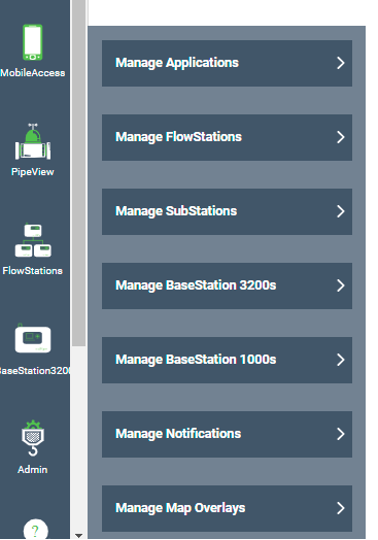
- Add New Overlay:

- View Map Overlay:

- New LiveView graphics were also created specifically for the SubStation RV and SubStation CP to differentiate the devices from a standard SubStation graphic.
November 19, 2021
Enhancements
- Show user the estimated Program run time

- To help users create programs, we now display a new field that calculates the user’s estimated program runtime.
- The Schedules tab has been reorganized to comprehend a user’s workflow based on the parameters that will affect a Program runtime.
- The Estimated Program Runtime is based on programmed zone runtimes, cycles, soak times, and the number of concurrent zone set up.
- The Estimated Program Runtime is based on the program running to its full runtime and does not account for Start, Stop, Pause, or Empty conditions, or, Upper-limit moisture thresholds.
- There are other factors that may affect a Program runtime that cannot be estimated because of Baseline’s unique ability to dynamically update in real-time based on Flow, Pressure, Rain, Moisture, Temperature, and more.
- The Water Window will highlight RED if the user’s estimated program runtime is greater than the specified water window. The user can still save the program will that configuration.
- The estimated program runtime is also displayed on the main Schedules page associated with each program under a new column header “estimated runtime.

- In AppManager, when a user adds a new controller to their Company/Site, they can now add a user directly to the controller at that point in their workflow.
- Previously, the user would add the controller and then have to go back to the old BaseManager admin tool to add a user.
- AppManager: Validation for Flowstation Controller Assignments
- Show controller name as “No Description” if name is empty
- Allow Super User to manage controller access in the BaseManager “Administration” tool
- AppManager: Validation for Controller Substation Assignments
- AppManager: Admin > Introduce Controller Access Level User Validation
Sustaining
- Archive unused data – Tables to be reviewed
Bug fixes
- Duplicated SubStations in UI, only few real
- Flow rate not showing for the first bar of flow usage
- AppManager: Mainline getting disappeared when we remove zones from Mainline assignments
- BaseManager: Maps – Custom Marker – Validation missing for Label
- Status Color Issue (ES-833)
- Pressure data is not populating correctly in Analytics (ES-831)
- Basemanager: Schedules/Programs > Deleted zones not getting updated in controller
- Basemanager: Programs > Not able to add more than 1 start condition
- BaseManager: Program Specific Devices (Booster Pump) – Server to Controller – Deleting booster pump sync is missing
- Quick Zone Runtimes with Weather Issue
- Clearing an alarm is updating multiple records instead of just the required records in the database
- Basemanager: Schedules/Programs > Not able to delete All the Start Times (ES-857)
- BaseManager: Schedules/Programs > Not able to add Multiple Device Start/Stop/Pause conditions (ES-857)
- ETo values from the server are too large
- “Help” link in BaseManager all get “404” message
Bug Fixes for patch v4.32.3
- Resolved issues in Analytics
- One minute flow rate not being displayed correctly
- Historical Flow Meter Totals does not match the same value as Flow Meter Totals in the Report on BaseManager.
- Resolved issues in BaseManager
- Estimated run times not calculating when a Primary Zone is added.
- Saving user alert permissions does not apply once user clicks SAVE user alert priority assignments.
- Disable “Administration” option for Site Admin level users not working correctly.
- Resolved issues for Alert Subscriptions
- Context
- There was a limit to the number of selections a user could make on the Alert Subscriptions page in the Administration tool. The limit was set at 1,000 selections. If a user made more than 1,000 selections on the page and attempted to save their selections, the Administration tool would not save their selections that exceeded the 1,000 limit. There was no feedback or input for the user to know this occurred. The fix for the Admin page increased the limit to 10,000 selections.
- Currently, City of Scottsdale has the most active selections at ~1,100.
- Alert Subscriptions Issue not working correctly.
- Alert Subscriptions doesn’t add all users when Admin sets “Set All On”.
- Alert Subscriptions selecting “All off” on controllers will also select “All Off” on other controllers.
- Selecting “All on” for controllers will also set other alert subscription for other controllers to on.
- Controller Firmware Version Link Redirecting to Not Found Error Page.
- Context
- Resolved issues in PipeView
- Flow activity report graph usage and pressure label/header getting collapsed.
- Resolved issues for SubStation RV/CP GA readiness
- Add SubStation RV puts the new RV into wrong spot in UI.
- Add SubStation RV to 3200 appears in wrong place in UI.
- SubStation RV disappears from 3200 “managed SubStations” list after being added to a 3200.
- SubStation RV “description” won’t save.
August 27, 2021
- Schedules tab updated to utilize web service calls which will dramatically speed up the UI experience
- Only BaseStation 3200 controllers with v18 firmware or higher will see the improvements. No changes to the BaseStation 1000 UI experience.
- Dates in BaseManager, AppManager, and MobileAccess now show “2021” instead of “2018”
- Database enhancement to store Manual Run and Learn Flow events
- Bugs/Issues that have been resolved:
- AppManager slide-out breaks when a user selects “Canada” as the country location
- SubStation issue in AppManager won’t allow a user to authorize a SubStation
- Delete program functionality not working in BaseManager
- Removing a mainline in AppManager should not delete the zones on the mainline
Overview
- The primary focus of the v4.30 release was to resolve issues with data integrity and device statuses. In total, there were 84 unique stories/issues that were addressed in this release. Most of the issues were “under the hood” fixes in the database but there are many improvements to the customer-experience.
This is a list of bugs that were fixed in this release that impact customer-experience:
- Site status color not updating correctly in the UI
- BaseManager: Missing Controller name in controller list
- Can’t change 3200 site under AppManager
- Fix duplicate pipe view drawing issue
- Programs: Disable Save on the first click
- In analytics Device two wire real time values are not showing up
- App Manager: Analytics > Getting 400 bad request error while viewing Zone info
- BaseManager moisture chart changes color on data gap
- App Manager: Issues on Messages/Envelope – Console Errors
- App Manager: Issues on Messages/Envelope – Performance Issue
- Slow Admin FlowStation screens
- App Manager: Analytics/Graphs – Validate the data From Company View
- App Manager: Analytics/Graphs – Validate the data From Site View
- App Manager: Analytics/Graphs – Validate the data From Controller View
- App Manager: Analytics/Graphs – Issues on Zone View
- Replace faceplate feature is not working
- Add Controller Page showing blank white Screen
- App Manager: Analytics/Graphs – Validate the data From Zone View
- BaseManager controller status color wrong for two-wire “Over Current”
- Controller Substation assignments not saving/ deleting properly
- Mobile: Status Color Missing For the Specific Controller
- BaseManager: Device > Controller goes offline when we edit device description
- Select a company to continue info is getting hidden when banner is enabled
- BaseManager: Notification Banner comes one more time when changing the company first time
- Status color not changing for companies
- BaseManager – Automatic Schedule stuck in waiting status
- BaseManager: unable to edit or remove water source empty condition
- App Manager: Issues on Messages/Envelope – Count Issue
- [AppManager] Don’t highlight in red the authorization PIN before submission in Admin Tools
- Aside from data integrity issues, a significant contributor to status issues related back to the SubStation and FlowStation not being fully “plumbed” into BaseManager. For example, since we do not show a FlowStation device in the “Controllers” list in BaseManager, a site could have a red “error” status, but when the user looks at their controller list, they may not see any errors. This is because the site is reflecting the FlowStation error but we don’t show any FlowStation devices to the user.
- Another issue occurred in AppManager in the Message envelope. A user could see messages in Quickview but not in AppManager. This created calls into support because customers were confused about the messages showing up in some places and not others.
- To resolve the status issues and message issues, we needed to integrate the SubStation and FlowStation devices into BaseManager just like a 3200 or 1000. The first step was to update the “Manage Subscriptions” tool in BaseManager to include the SubStation and FlowStation. Once the server and database understood how to handle the “active” or “inactive” status of a device, we could plumb the rest of the UI with SubStation and FlowStation updates. The devices now appear on Maps and can be geo-located using MobileAccess. A FlowStation can be added to a Map at the “Site” level. A SubStation can be added to the Map at the “Controller” level. The devices appear on the Controller list for a site. The devices use a “nesting” logic starting with a FlowStation then 3200 then SubStation. The LiveView pages for a SubStation and FlowStation have new graphical overlays so the user knows which device they are working with.
Architecture Changes
- We are changing how one of the biggest data hog pages behaves.
- The “Flow Setup” tab is notorious for being slow and this is because there is a ton of configuration data we have to send.
- We’re going to move the Flow Setup page to the new model of pulling data. This release will focus on 3200 controllers with v16 firmware or newer (the 4.30 release will cover 12.34 3200s and 1000s) Instead of asking the controller for its various data groups for flow configuration, we’re going to store it in the database and only the ask the controller for what changed. This will mean the page will load much, much faster.
- Dev Stories to implement new architecture
- DG314 Message parsed into database
- DG313 Message parsed into database
- DG312 Message parsed into database
- DG311 Message parsed into database
- DG310 Message parsed into database
- BM 3200 Flow Setup: web-services for mainlines
- BM 3200 Flow Setup: web-services for control points
- BM 3200 Flow Setup: web-services for water sources
Bug Fixes and Resolved Issues
Speed/Performance
- SubStation Remote Valve get no response to RG opcode
- Event logs downloaded from FlowStations are not showing up in file list
- Empty program description causes exception error
- Getting Json_date error while testing weather station
- Getting company data info keeps loading
- New 1000 can not add a new program
UI/Status Issues
- Flow Tachometer missing on initial loading of Pipeview
- Status color not reflecting correctly in quick view section
- Menus are getting hidden when page Assign Tipping Rain Buckets loads
- Description is not getting updated correctly
- Company name getting displayed twice when system turned on from sleep mode or duplicate session
- Running status displayed for controller when no zones are watering
- Tipping Rain Bucket Chart is not correct
- Tipping Rain Bucket marker does not save on the Map
- Graph not scaling correctly
- Tipping Rain Bucket Chart is not correct – 24 hr chart
- Change Zone_Program_Mapping columns
Known Errata
No user feedback in value fields
- BaseManager does not have any “user feedback” to indicate to the user that something they did was wrong (e.g. they put in a bad value for a flow threshold so we turn the text red and tell the user it’s incorrect so they know to change it). This is true today, but, with the new architecture this could lead to some confusion. Currently, the controller won’t accept a value that does not fit within a specific range for a given field. Because we’re not sending the data to the controller anymore BaseManager will allow the user to input a bad value and “save it.” It still will not make it to the controller because once the controller talks to the database it will reject the bad value and it will revert it to the value that was already stored in the controller or to a default value. The next time the user logs in they will see the “controller value” and their value which may confuse them.
- To resolve this we need to implement a new feature which is enabling user-feedback. This is a pretty heavy lift and not a quick fix. We will develop the user-stories and schedule for an up-coming release.
- To workaround this issue in the near term, Bob will pull together all of the “value ranges” for each field in BaseManager for Support to reference.
- Example scenario
- A customer calls in because they keep entering a flow value and it saves, but, when they leave and go back to that page the value changes.
- Support will ask what page, what field, and what value did they edit. They will reference the acceptable value range for that field and educate the customer.
- Example scenario
Real-time data in Analytics will break
- Due to some database conflicts involving BaseManager and AppManager, the Analytics tool in AppManager will not be able to display real-time data.
- There is a fix currently in progress, but, it could take a week or more to resolve. This fix will be implemented in v4.30.
What will change with BaseStation 3200 v18.00
Architecture Changes
- To help facilitate the changes made to the database and how we display data in BaseManager, the 3200 also needs to update how it sends data.
- This firmware update and platform dramatically reduces how much data is sent from the controller and will speed up BaseManager performance and provide better status updates.
- There are many, many updates to improve communication and networking stability to the SubStation and FlowStation using the IoT server (cloud networking).
Bug Fixes and Resolved Issues
- Backslashes handling in BM packets
- Out of memory crashes in Cloudgate w/Munro pumps
- BaseManager packet size fixed at 1200
- Status is showing up with PG twice
- BaseManager Packets – new segmentation method
- Delayed or missed allocations cause water interruption
- Change 3200 water allocation for five minute interval
- Controller minute log not sent to server
- Remove 10 second delay on status packets from 3200
- BaseManager registers send incremental status before full status
- Volunteer configuration messages when changes are made
- Resolve SubStation configuration error
- Add checksum to compare last configuration to current configuration
- SubStation unable to assign zones if IP=0
- Incremental CR packet always sends rain gauges
- 3200 sends multiple incremental TE data groups
- Add missing SubStation property on decoder assignment packets
- Incorrect text field in rain gauge 132 and 133 packets
- SubStations being disconnected when running manual zones
- Test flow reading from SubStation faux Flow Meter shows zero flow
- Unable to set new KValue for faux flow meter from BaseManager
- Rain Gauge description not set with DG133 packet
- Pressure sensor test on SubStation from BaseManager always returns Device No Response
- Pressure sensors not returned from a BaseManager search when on SubStation
- Descriptions do not work when ending with “\” characters
- Editing the Lat/Lon for devices doesn’t send incremental config
- Two menu fields highlighted at same time in WiFi screen
- Flow reading from SubStation Flow Meters are wrong
- Unable to edit use IOT setting for FlowStation and SubStations
- Reconnect to BaseMgr command time delay not working
- Use IOT Server for SubStations property not working
- Extracting full packet from CNModule stream misses
- Changes made to a program results in an empty 310 data group packet
- Verify and repair is not correcting all addresses on sub stations
- not saving subnet correctly
- Phantom flow readings at Nike
- Controller status is wrong. Previous status being sent
- Missing event entries for high flow shutdown
- Verify/Repair does not include SubStation devices
- A flow status packet isn’t sent to server sometimes when flow goes to zero
- 3200 never reconnects to FS after CNM-Cell reset
- Obey Global Conditions and Rain Delay
- Flow menu gets stuck under the “Mainline Conditions” sub-menu
- 3200 never recognizes FlowStation has disconnected
- Verify reconnect methods for controllers
- Incremental CR packet always sends rain gauges
- Test Engine: search for rain gauges fails
- Event log has a program pause entry every minute for the same program
- Rain gauge showing interesting values on self-test
- ECO for V18.0
- SubStation: unable to assign zones if IP=0
- Rain Gauge doesn’t clear total rain when assigned
- Not getting response for Raingauge request
- Getting unknown status from the controller
- Firmware v17.17.1 still shows incorrect rain rate
- Add Checksum to compare the last configuration to the current configuration
- FlowStation control point remains on after FlowStation disconnects
- substation configuration Error
- Cloud Network Module seems to disconnect often from BaseManager
- Volunteer configuration messages when changes are made
- BaseManager register sends incremental status before full status
- Remove the 10 second delay on status packets from 3200
- BL-3200 shows incorrect rain rate
- BL-3200 shows “Infinite” for Rain Rate for BL-5407
- Reconnect to BaseManager after AT&T SIM switches APN
- Status is showing up with CN in it twice
- Rain gauges not working in test engine DEV command
- Controller minute log not sent to server
- Cursor at beginning of Password in CNW WiFi password setup should be at end FW 17.17
- Four minute water allocation and control point timer
- Multiple TY:IN or TY:AL in split CR packets
- Cloud Network Module “stuck” on cell modem
- “Program Memory is Low” Popup
New Features
- Support for Precip Sensor!
- Support for SubStation RV/CP! (under the hood)
Architecture Changes
- Previously, we would delete any data group information from the database because we knew the controller would send up fresh data every time. Moving forward, since we’re only going to send changes, we don’t need to delete the configuration data or status data which allows BaseManager to grab the data faster.
- This is how AppManager works today. It’s why slide-out menus never have “spinning wheels” and are always instantly populated.
Bug Fixes
Speed/Performance issues
- Mal-formed DG-113 RQ packet sent to 3200
- Tipping Rain Bucket Page Issues (with device)
- BaseManager water source enabled doesn’t work
- stop packet storm when controller are connecting and disconnecting
New Features
- Updated Super User Experience in BaseManager/MobileAccess to no longer auto-display the first Company in the database. We now load a white screen and the Super User selects the Company they need to access.
Architecture Changes
- We modified how most of the pages in BaseManager pull data from the database to better support a “multi-user” architecture.
- We are now asking controllers for about half as much data as we were previously. This is accomplished by storing more data in the database. Instead of asking the controller for its various data groups every time, we can store those data groups in the database and then update only the elements that have changed.
- For example, if a program is changed, we don’t need to send the entire programming configuration back up (i.e. every station, start time, conditions, thresholds, etc.), instead, we just look at what changed and ask the controller for that data. We then update the database with the changes and use that to display in BaseManager.
- This way, when multiple users are accessing the same controller, it’s only sending “changes” instead of full data groups. The database then provides BaseManager with the data it needs to populate the various pages a user can access.
- This is much, much faster.
Bug Fixes
Speed/Performance issues
- Large SR packets are getting merged in the server and sent up too large
- company data not displaying in analytics app
- Web browser need to get packets before Database
- stop un-needed requests to the database
- store items like controller id so we dont make as many DB queries
- Remove requests for duplicate packets on 3200 register
- Remove redundant parsing of parameters in messages
- Reduce database hits for event and log files
UI/Status issues
- menu format issue
- company data not displaying in analytics app
- site level analytics not populating
- pipe view not able to draw the attached configuration
New Features
Precip Sensor!! (beta)
September 9, 2020
- New Feature (AppManager):
New notification banner will appear in App Manager and all supported applications including BaseManager and Mobile Access. The notification banner will be a new resource for important product news, maintenance updates, and more.