

April 14, 2026
New Features and Enhancements
- There were no new features added in this release.
User-experience Improvements
There are no user-experience improvements for this release.
Squashed Bugs
- An issue with Salesforce credentials being visible in CloudWatch logs was resolved for security requirements.
- In the Admin Tool, an issue with the “Access Update By” and “Access Updated At” field not properly populating was resolved.
- (ES-1747) – On SiteMap, there was an issue with the assets consolidated into a “bubble” not displaying correctly. This is now resolved.
March 2026
Self-Activation released for WeatherTRAK mobile. Controller filters changed for WeatherTRAK mobile site overview. You can read about the features here.
For internal support documents visit: Support and Sales Brief – Self Activation.docx
(Note that the activation process has been changed, you can visit this article to see how self-activation affects things: https://hydropoint.helpjuice.com/en_US/bl-smart-controllers/how-to-activate)
Admin Center pushed to production for beta use. You can read about the feature here.
April 15, 2025
New Features and Enhancements
- There were no new features added in this release
User-experience Improvements
- The “Learn how to update your firmware” on the OptiFlow Inspector tool had a broken link and was non-functional. The link has been updated to direct customers a knowledge base articles that explains how to update their firmware.
- A similar issue was fixed for a link, “Learn how to assign stations to a pipe.” The link now directs the customer to the correct knowledge base article.
Squashed Bugs
- An issue with the “Single Controller Measured Usage History” report not showing the correct totals has been resolved. All fields are displaying the data as expected.
- An issue with generating the “Site Water Usage” report for large OptiFlow sites was fixed. The report is now working as expected.
April 1, 2025
New Features and Enhancements
- Support new 19 band modem and eSIM
- Exciting new functionality for the ET Pro3, LC+, and OptiFlow XR controller lines now supports the ability to use a new 19 band cellular modem with integrated eSIM.
User-experience Improvements
- Updated Valve No Connect behavior
- In firmware versions v7.14 and v8.12, a controller will no longer stop scheduled or manual irrigation from occurring when a Valve No Connect alert has been raised.
- Old behavior

-
- New behavior

- Quarantine Mitigation
- Old behavior
- If a controller fell into a state called “chatty mode,” due to a hardware alert or a network alert, the controller would excessively send so many alerts a small handful of controllers could overwhelm the entire production server. To prevent that we isolate those controllers and take them offline to be “quarantined.” A quarantined controller could not be allowed back online until the root-cause of its alert was resolved.
- New behavior
- The controllers have been updated to suppress “over-alerting.” The controller will still send an alert for a hardware or network issue but now has logic that prevents the controller from sending excessive alerts. This ensures the controller can remain online and functional for the customer.
- Old behavior
December 10, 2024
New Features and Enhancements
- There were no new features added in this release
User-experience Improvements
- The field in WeatherTRAK Central that displays the subscription end date for a controller has been updated to reference the end date from a new source. Previously, the field would use an end date sent by the controller. Unfortunately, the farthest out the controller’s end date could go is 2032. Controllers with subscriptions that go beyond 2032 would show the incorrect end date causing confusion. Now, the field in WeatherTRAK Central uses the subscription end date from NetSuite and correctly shows the subscription end date.
Squashed Bugs
- An issue with long wait times for the “Jump to Controller” feature on the Home page has been resolved.
- An issue with usernames not displaying properly in the header bar has been resolved.
- An issue with the mobile app showing an incorrect water window for program.
- An issue with alerts not populating correctly on the “Alert Notification Selection” page has been resolved.
October 15, 2024
New Features and Enhancements
- On the Home page, when viewing the Account Map, the map icons representing a site will change color from Red or Green to Blue to indicate that a controller on the site is either running scheduled irrigation or manual irrigation.
User-experience Improvements
- On the Home page, in the Alerts section, a “Select All” button has been added.
- In the Admin tool, a user can now select “CIMIS” as a weather source and they can specify the CIMIS station number.
- A “What’s New” link has been placed on the Home page to link users to our Product News page.
Squashed Bugs
- An issue with FM300 controllers showing up Alert Reports has been resolved.
- An error message that incorrectly populated when updating H2O OEM boards has been fixed.
- A totalization error in Alert Reports has been resolved.
June 11, 2024
New Features and Enhancements
- When managing Event Pauses and Master Valve Override tasks, a user can now “Resume” a suspended task after a user-specified number of days. This is useful for when a user wants to maintain a scheduled task with a temporary interruption, instead of having to delete the scheduled task and recreate it.
- The initial support for LC+ (6-18 station) controllers to support 4 programs has been tested and implemented. The next steps for full implementation require OTA updates for all LC+ controllers in the field and then releasing the final server-side update in July or August.
User-experience Improvements
- For internal users, the Admin UI has been updated to no longer show “ETE” as an option. Since we moved to ETE+, this is no longer a valid choice.
- The OptiFlow Mainline Usage Report subscription UI has been updated to prevent users from accidentally locking in the “report date” for their subscriptions. Prior to this release, if a user selected the date in the subscription date field, the generated report would always be for the one day, which was confusing for customers.
Squashed Bugs
- An issue with day and time fields not showing correct data in the “Scheduled Tasks” UI has been resolved.
April 9, 2024
New Features and Enhancements
- New Reports! There are two new customer-facing reports that are now available: Controller Manual Irrigation Runtime Report and Controller Learn Flow Report. Both reports provide valuable context for customers to better understand how water is being used at their sites and how their flow values have or have not changed over time.
User-experience Improvements
- The Controller Signal Strength Report has been updated to support the selection of a date range. Previously, the report would generate the values for the previous day only. The updated report will now show a range of dates based on the user’s specification.
- The firmware for the H2O adapter board can now be updated over-the-air. This is an important enhancement for future development of the WeatherTRAK 2-wire technology and our ability to efficiently roll out new features.
Squashed Bugs
- An issue with the Multi-Controller Alert Report has been resolved for (ES-1248).
- An issue with the logo tool not working for reports has been resolved (ES-1289).
February 13, 2024
New Features and Enhancements
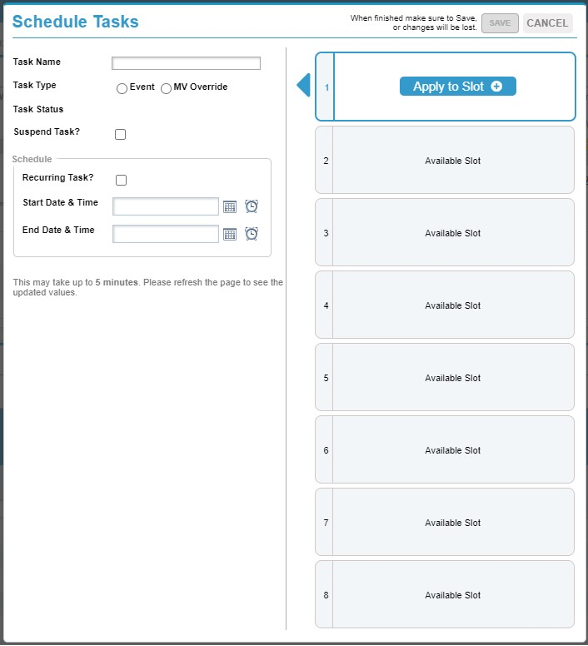
- WeatherTRAK Central will now support 8 scheduled tasks! The WeatherTRAK Central interface will allow you to create new tasks and schedule them for a single controller or for multiple controllers. Click here to learn more!
User-experience Improvements
- Budget Manager was updated to allow Water Bills to be aligned to the month. This allows users to see “Water Bills (Aligned with Calendar Month)” as a selectable option from the “Actual Usage Source” drop-down so they can view reports of water bill data aligned to calendar month, compared to monthly budget data for data quality and analysis purposes.
Squashed Bugs
- An issue with a new OptiFlow Inspector test has been resolved (ES-1212).
- An issue with the logo tool not working for reports has been resolved (ES-1289).
December 12, 2023
New Features and Enhancements
- New OptiFlow Inspector test captures whether or not a hydraulic structure is configured with a master valve as part of the POC and if there are stations also a part of the hydraulic structure. The test will show what stations are part of the hydraulic structure managed by a master valve to help the user understand their configuration.
- The Controller Inventory Report will now allow a user to select a single, specific Account to view. This helps give the user the information they need faster versus having to pull the report for All Accounts every time the report is generated.
User-experience Improvements
- Two new flow sensor types have been added to WeatherTRAK Central: Data Industrial 1” PVC flow sensor and Data Industrial 1” Brass flow sensor.
Squashed Bugs
- Two OptiFlow configure page issues were resolved. One issue was generating a configuration message incorrectly. The other issue was related to a deleted controller still appearing on a mainline in the UI.
October 24, 2023
New Features and Enhancements
- Enhanced user-management capabilities in the Admin tool allows HPDS employees to see the last time a user account was modified, what was modified, and who made the changes.
- A new API was created to allow HPDS employees to pull a list of controllers that had a “Controller Status” change within the last 24 hours.
- A new text alert technology was implemented to ensure HPDS can continue to send alerts via text messages to customers across all cellular service providers.
User-experience Improvements
- The Admin Tool Update button is now functioning as expected
- Admin Tools system now allows user to clear application and post message/preview message as expected
- Admin Tools system now clears the mobile app preview when the application is changed
- OptiFlow Controller Runtime Analysis Report page will now only show fields that are relevant
Squashed Bugs
- An alert typo was fixed on the OptiFlow Optimize page
- Admin Tool Site Import Timing Out issue resolved
- An issue with the Multi-Controller Alert Report displaying the wrong mainline was resolved
- Viewing controllers from the Homepage from controller status summary – Displays search filter from previous search but does not affect the filtered list issue resolved
- Runtime and Measured Usage Report and Runtime Report now showing consistent data
- Alerts List page is now displaying time correctly
- An issue with Importing Assets into SiteMap was resolved
August 24, 2023
New Features and Enhancements
- N/A
User-experience Improvements
- N/A
Squashed Bugs
- Resolved issue with wrong year posted in copyright text
- Resolved issue with the Account Summary field not collapsing on the Home page
- Resolved issue with the System Messages interface that would not allow all colors to be selected
March 7, 2023
New Features
- We added a new column for the “Site List” page in the Admin tool to show the “Water Agency” associated with that site.
Squashed Bugs
- We resolved an issue in 7x firmware that would show a duplicate flow alert for station 49 and/or 50.
Improved User-Experience
- A link on the OptiFlow Configure Page was directing users to an incorrect webpage. The link has been updated to direct users to the correct page. UPDATED LINK
December 16, 2022
ET Pro3 and LC+ firmware release v7.13
New feature:
- Now supports Verizon as a cellular service provider – initially for customers in poor AT&T coverage areas (contact support for questions/needs).
- Key information:
- Firmware must be updated in the controller for Verizon to work
- Does not require a new modem, just a new SIM card
- New part numbers are available
- WTLC-SIM-VZ, WTPRO3-SIM-VZ
- Includes Verizon SIM, Instructions, and firmware update USB key
- Strongly recommend customer tests their site to validate quality of Verizon signal BEFORE getting the new SIM card
Bug Fixes:
- Target MAD issue
- Issue = When Target MAD is not 50% the controller is not properly scheduling irrigation
- Fix = Firmware updated to allow for variable Target MAD values for correct irrigation scheduling
- MAD Limit Switch
- Issue = When MAD Limit Switch option is turned on, the controller is not scheduling irrigation properly
- Fix = Firmware updated to allow the Target MAD to limit irrigation when the Switch is turned on
- Excessive User Rain Pause
- Issue = Rain Pause events unintentionally set at controller panel
- Fix = Panel code updated to suppress “phantom” button presses
New controller behavior:
- Old behavior
- All default program and zones settings in the controller are set to Auto.
- The idea was that we could help ensure a site would not “burn up” if an installing contractor forgot to program the controller.
- The outcome is that the controller could initiate irrigation without having to be programmed
- The unintended outcome is that the controller would often initiate irrigation DURING installation which would cause problems for the customer
- New behavior
- The Water Day Mode default setting is now OFF instead of Auto.
- This will prevent the controller from irrigating during the installation process.
- It’s now 100% up to the customer to program the controller for it to irrigate
OptiFlow XR firmware release v8.10
New feature #1:
- Now supports Verizon as a cellular service provider – initially for customers in poor AT&T coverage areas (contact support for questions/needs).
Key information:
- Firmware must be updated in the controller for Verizon to work
- Does not require a new modem, just a new SIM card
- New part numbers are available
- WTOXR-SIM-VZ
- Includes Verizon SIM, Instructions, and firmware update USB key
- Strongly recommend customer tests their site to validate quality of Verizon signal BEFORE getting the new SIM card
New feature #2:
- Now supports H2O 2-wire device diagnostics!
Key information:
- V8.10 for OptiFlow H2O 2-wire controllers will now enable diagnostic testing for individual 2-wire devices on the wire path.
- This is for 8x firmware ONLY
- A new H2O diagnostics and troubleshooting guide has been created to show how to run the tests at the controller panel
- The controller firmware AND the adapter board firmware must both be updated for the diagnostics to work. If the adapter board firmware is not updated, the controller will generate an alert “Adapter Board not found.”
Bug Fixes:
- Target MAD issue
- Issue = When Target MAD is not 50% the controller is not properly scheduling irrigation
- Fix = Firmware updated to allow for variable Target MAD values for correct irrigation scheduling
- MAD Limit Switch issue (ES-920)
- Issue = When MAD Limit Switch option is turned on, the controller is not scheduling irrigation properly
- Fix = Firmware updated to allow the Target MAD to limit irrigation when the Switch is turned on
- Excessive User Rain Pause (ES-944)
- Issue = Rain Pause events unintentionally set at controller panel
- Fix = Panel code updated to suppress “phantom” button presses
New controller behavior:
- Old behavior
- All default program and zones settings in the controller are set to Auto.
- The idea was that we could help ensure a site would not “burn up” if an installing contractor forgot to program the controller.
- The outcome is that the controller could initiate irrigation without having to be programmed
- The unintended outcome is that the controller would often initiate irrigation DURING installation which would cause problems for the customer
- New behavior
- The Water Day Mode default setting is now OFF instead of Auto.
- This will prevent the controller from irrigating during the installation process.
- It’s now 100% up to the customer to program the controller for it to irrigate
November 19, 2021
Enhancements
- Update Controller Alert Status on Manual Page

- To resolve an customer experience issue caused by the Manual page not correctly showing the user the status of the controller or the alert status of the controller, we created a new “Refresh Status” button.
- The new Refresh Status button will create a command that is sent down to the controller asking the controller for its current status and alert status.
- The controller send WeatherTRAK Central its updated information which will be displayed on the Manual page. This allows the user to know exactly why a controller may not be able to manually irrigate. The previous behavior was such that a controller might have an active alert that wasn’t displayed on the Manual page. The alert would prevent manual irrigation at the controller, however, the user believed that the manual irrigation event took place even though it did not.
- NOTE: Because we are communicating directly with the controller in the field, it may take a few seconds for the Manual page to update.
Sustaining
- Performance – Flow Collector Processing Optimizations
- Flow Collector – Store FC Config Values in Server Blob
Bug fixes
- Manage Page: Controller with Pump Station can’t deselect All Stations after hitting Preview Changes button.
- Alphabetize the Budget Monitor picklist for Account selection
- Site Map – Selecting an Asset Icon causes the map to zoom out
August 31, 2021
Improved:
- Release for Beta: Enable “standard” schedule for OptiFlow controllers
- When an OptiFlow controller is first activated, it can now be fully programmed, including the POC and Mainline, using the Mobile App or the Program page in WeatherTRAK Central.
- The OptiFlow controller will act as a stand-alone controller running the standard schedule that is used for the Pro3 and LC+
- When a customer is ready for the controller to run the OptiFlow schedule or when they are ready create an OptiFlow group they can update the OptiFlow configure page and create the hydraulic tree.
- When the controller is running the OptiFlow schedule a new icon will appear on the Manage and Program pages to show “Schedule type: Optimized”
- New OptiFlow Catastrophic Leak Alert behavior
- Updated behavior:
Normally-Open master valve
- If the leak alert occurs outside of the site irrigation window, the controller will close the master valve
- If a leak alert is active inside of the site irrigation window, and there are stations actively irrigating, the controller will not close the master valve.
- If the leak alert has not been cleared, the controller will close the master valve when the site irrigation window ends and the leak alert is still active.
- The master valve will remain closed while the controller is outside of the site irrigation window.
- If a leak alert is active inside of the site irrigation window, and there are no stations actively irrigating, the controller will close the master valve.
- If the Manager controller(s) are running the back-up queue, the controller will keep the master valve open for the duration of the site irrigation window.
Normally-Closed master valve
- If the leak alert occurs outside of the site irrigation window, the controller will keep the master valve closed
- If a leak alert is active inside of the site irrigation window, the controller will keep master valve open for the duration of the site irrigation window. For Single Mode controllers, the master valve will also close if no stations are running.
- If the leak alert has not been cleared, the controller will keep the master valve closed when the site irrigation window ends and the leak alert is still active.
- The master valve will remain closed while the controller is outside of the site irrigation window.
July 27, 2021
Improved (WeatherTRAK Central):
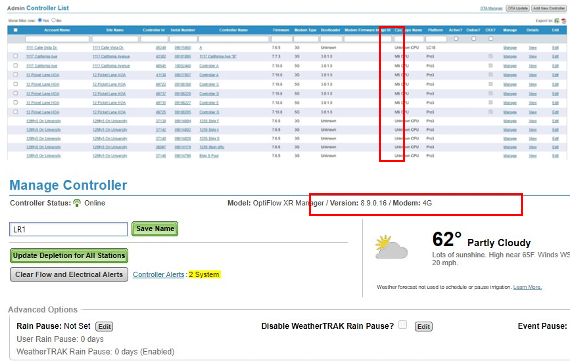
- Users now have the ability to see Modem Type for a controller (or controllers) in various screens in WeatherTRAK Central.
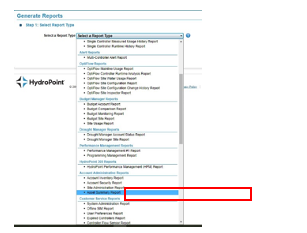
- Asset Summary Report is now customer-facing. We’ve had the Asset Summary Report available since last year, however, it wasn’t customer-facing, now it is!
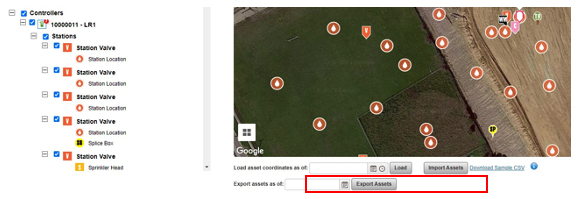
- Users can now export site asset data. We’ve been able to import asset data but we wouldn’t allow a user to export that data. This update allows a user to export all of the asset data for a site. This is very helpful for users with lots of assets and sites (LA County Parks, Salt Lake County Parks, etc.)
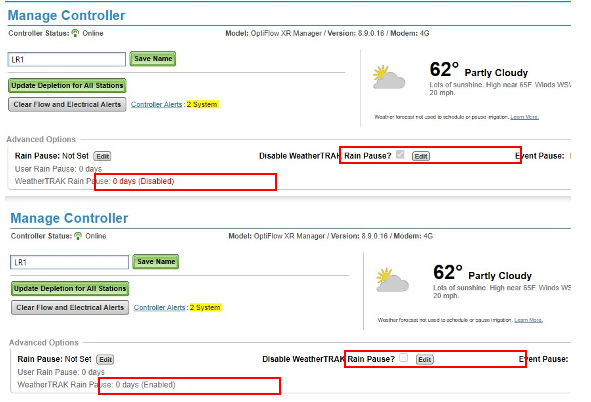
- We have removed “Disable Rain Pause” from “Edit Rain Pause” menu. The driver for this story came from Chad Sutton who was very frustrated with how the “Disable Rain Pause” button was located in the same menu as the set “Rain Pause” workflow. Multiple times each season, one of his managers will accidently turn off the WeatherTRAK Rain Pause when they think they’re actually setting a User Rain Pause. Further, we don’t track who turned off the WeatherTRAK Rain Pause in that menu. This update removed the Disable functionality from the sub-menu and simply gave it its own workflow – this was based on user-feedback from Chad. Additionally, we can now track who disabled the WeatherTRAK Rain Pause and when.
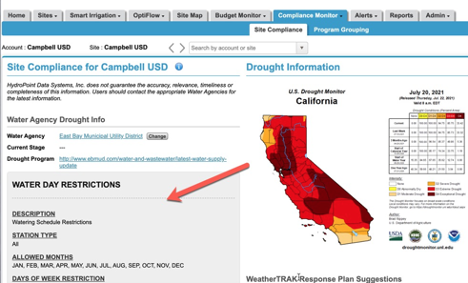
- Water Day Restrictions section in Compliance Monitor has been removed. The content in this grey section wasn’t dynamically updated, so it has now been removed to eliminate any confusion for users.
- Additional zoom levels have been added in Site Map, when using a mouse scroll wheel and hovering over the map.
- Asset icon clustering is less aggressive, now displaying more assets when zooming further out.
- Asset icon clustering is turned off while the “Lock Icons?” is deselected.
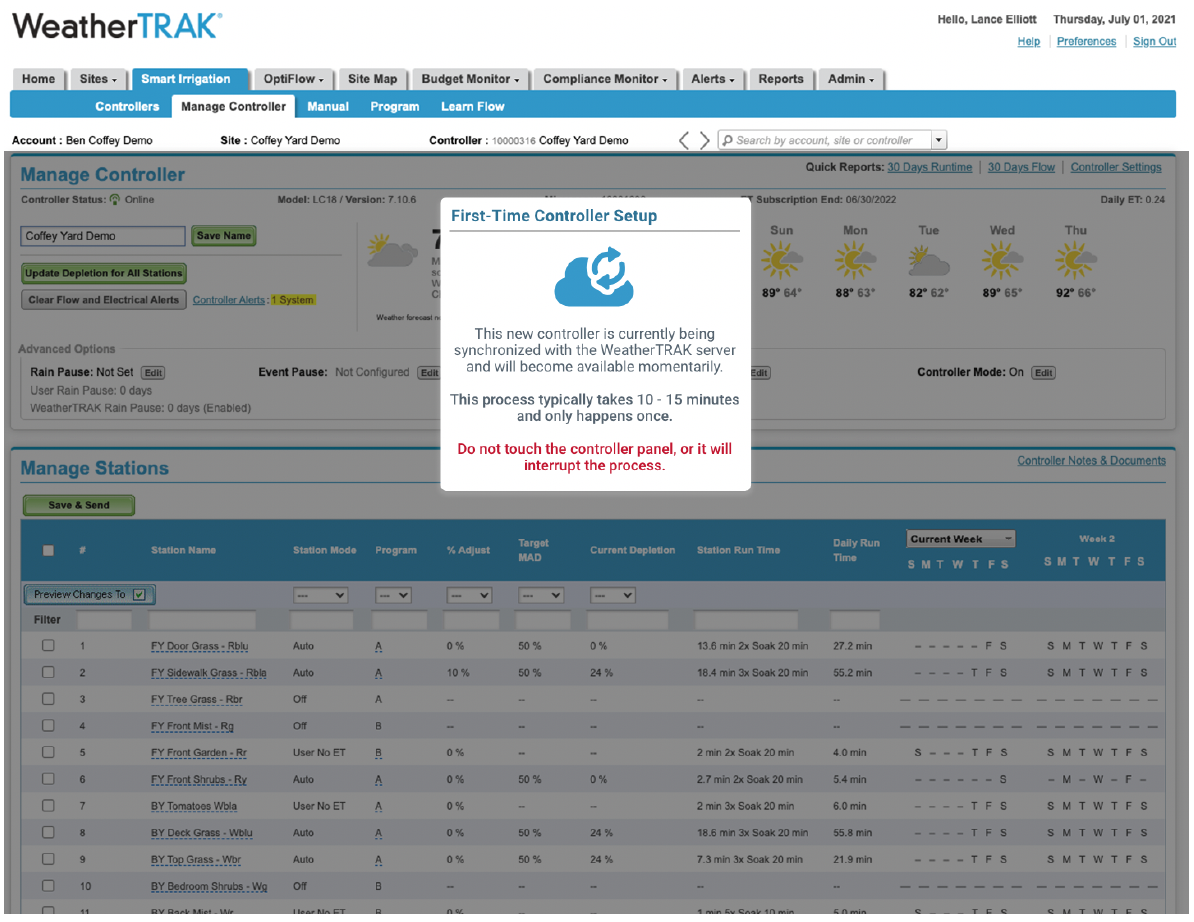
- When a WeatherTRAK controller is powered up for the first time, synchronization between the controller and the WeatherTRAK servers is required. This synchronization occurs automatically and takes 10 to 15 minutes to complete. There must be no interaction with the controller’s panel, or any program changes sent to the controller via the Mobile app or WeatherTRAK Central during this time. Any changes made risk being overwritten and will interrupt and prolong the overall synchronization process. A controller synchronizing with the servers will not be accessible in areas where you can make programming type changes. Instead, the site will cover the settings and present a dialog message.
November 23, 2020
WeatherTRAK Mobile 3.2.2 release:
- Fixed issue where User Rain Pause was not accessible during both enabled or disabled WeatherTRAK Rain Pause Events.
October 28, 2020
Improved (WeatherTRAK Central):
- It is now clearer what is being filtered when filtering table columns. Columns that are being filter are now listed in Currently Filtered by: at the top of the table. Additionally, more visual feedback been implemented when a column has been filtered.
- Station
snumbers have been added to the Asset Assigned To: Station dropdown list. - The Unassigned Asset category is now hidden when no unassigned assets are present in Site Map.
- Button layout was refined in the Manage Controller panel on the Manage Controller page.
- Station Valve asset icons that contain assigned assets underneath are better aligned with Station Valve assets that do not contain assigned assets in Site Map.
- Asset icon clustering has been added when map zoom levels cause nearby assets to overlap in Site Map.
- Manual irrigation now more intelligently acquires status updates minimizing unnecessary server requests.
- Enhancement to allow automated corrections to controllers with incorrect microzones.
- Enhancement to the way WeatherTRAK Central and Mobile App fetch status updates for manual irrigation.
- Fixed a bug on the Water Meter List page that prevented filtering.
- Fixed a bug in the Mobile App that was displaying the wrong icon for Valve No Connect alerts.
- Fixed a bug that was affecting cookies in the Firefox web browser.
- Fixed a bug that was causing OptiFlow stations to create Flow Alerts even when the station has been excluded.
- Fixed a bug that was preventing the Scheduled Learn Flow status from updating automatically.
- Fixed a bug that was preventing the Asset Details popup from displaying when the asset was part of a clustered pin.
September 8, 2020
New (WeatherTRAK Central):
- Schedule Learn Flow – Users can now schedule Learn Flow events at anytime using WeatherTRAK Central, you no longer have to do this manually at the desired time.
- Specify Stations – User can select exactly which stations to learn flow on
- Event Description for Learn Flow Event – Now you can name each learn flow event and include description, great if replacing sprinkler heads or making upgrades.
Improved (WeatherTRAK Central):
- Improved Performance for OptiFlow Mainline Usage Report – The report will load much faster.
- OptiFlow Manager and Member Controllers Unlock/Lock Independently – Now you can unlock an OptiFlow Member Controller even if the Manager Controller is unlocked (which previously would have suspended all controllers in that group).
- Improved Performance for SiteMap – Faster load times for assets.
Wednesday July 8, 2020
New (WeatherTRAK Central):
- User notification for when a user-session has ended due to time-out. A new notification will appear in WeatherTRAK Central to notify a user that they will be logged-out due to inactivity. The user will be redirected to the login page and admitted back into WeatherTRAK Central to the same page on which they were previously working.
Improved (WeatherTRAK Central):
- Map navigation within Site Map. “Tilt Map” option has been added to enable top-down viewing at close zoom levels.
- Functionality for pre-existing assets that can only be assigned to the Site. These are now automatically moved from “Unassigned Assets” and placed under the “Site” category.